
Your desk is clear.
Open an icon to begin.
FOR FOUNDERS & SMALL TEAMS
Camicus
Two local workflows.
Results you can inspect.
Use the Camicus plugin in Codex or Claude Code to check a weekly project brief or observe selected Mac security settings. No new dashboard to learn.
Weekly brief: two reviewed JSON snapshots → checked counts and blockers.
Mac audit: an authorized workspace → selected settings and TCP listener observations.

WEEKLY-BRIEF EXAMPLES / FICTIONAL DATA
Friday. Your client wants an update.
The website refresh has moving parts. You need a clear count of what is done and the approval holding up the work.
You provide: Project context and six task records, prepared as two local JSON files.
6 tasks. 1 blocker to bring up.
Three tasks are done. Pricing copy is waiting on client approval.
OUTPUT / WEEKLY BRIEF
6 total · 3 done · 1 in progress · 1 to do · 1 blocked
BLOCKER: WEB-5Await client approval of pricing copy
Inspect inputs and all 10 checks
- project.json
- Read
- tasks.json
- Read
- checks
- 10 passed
Recorded fictional inputs from October 11, 2026. A future run must use genuinely current inputs; changing a date alone does not refresh the facts.
- Workspace boundary Passed
- Project read Passed
- Project schema Passed
- Project freshness Passed
- Tasks read Passed
- Tasks schema Passed
- Tasks freshness Passed
- Project identity Passed
- Brief invariants Passed
- Source stability Passed
This local weekly brief passed the declared checks against the observed source bytes.
Save this result.jsonYour next move
Use these checked counts and the named blocker in your client update. Review the wording and send it yourself.
Why use Camicus? Reuse a consistent check each week instead of recounting tasks and copying blockers by hand.
All six examples are saved weekly-brief results using invented projects, not Mac audits or customer testimonials. This website does not run the checker or read your device.
Use the assistant you already have.
The alpha plugin packages one local engine and two shared workflow skills for Codex and Claude. Choose the work you want checked; your assistant uses its normal command permissions.
- Load the reviewed plugin. Download the alpha plugin, check its SHA-256 and follow the installation guide and its included INSTALL.md. Claude supports a session-scoped plugin directory; Codex uses a local marketplace. Loading it does not authorize every file or action.
- Choose a workflow and workspace. For a weekly brief, review project.json and tasks.json snapshots with your assistant. For a Mac audit, authorize an absolute workspace for a new result file. The plugin does not connect to your task app or turn arbitrary exports into verified facts.
- Inspect the result. The engine saves JSON with passed, failed and unobserved checks. Your assistant can read the result and explain it. Recheck a weekly result against current files with verify; rerun a Mac audit into a new file to observe current state.
Show example requests for my assistant
Weekly brief: “Use the reviewed Camicus weekly-brief skill with the project folder I authorize. Help prepare the two snapshots, let me review them, then check into a new JSON result. Show counts, blockers and failures. Do not send the update.”
Mac audit: “Use the reviewed Camicus mac-audit skill and the workspace I authorize. Run the read-only audit into a new JSON file. Explain observed settings, unobserved checks and visible TCP listeners. Do not change settings or attempt repairs.”
- Weekly brief
- Checks task counts, recorded blockers, copied context, freshness declarations and equality of observed source bytes. A pass does not prove source claims true or validate surrounding assistant prose.
- Read-only Mac audit
- Observes FileVault, System Integrity Protection (SIP), Gatekeeper, the application firewall, stealth mode and TCP listeners visible to the current user. Missing, denied, unknown and truncated observations do not pass. Listeners need interpretation; they are not automatically vulnerabilities.
- Mac audit limits
- Does not inspect Little Snitch rules or executable provenance, establish internet reachability, detect malware or certify whole-device security. No sudo, repairs or setting changes.
- Who can see results
- The engine writes locally and makes no runtime network requests. The assistant you authorize can access inputs and results, subject to its provider and session settings. Keep private evidence out of shared chats and public uploads; local execution is not an absolute privacy guarantee.
What a Mac audit result can look like
Illustrative findings, not an actual device receipt:
- FileVault: passed / enabled.
- SIP: unobserved / command unavailable.
- Application firewall: failed / disabled.
- TCP listeners: snapshot collected / requires interpretation.
The saved JSON includes fixed commands, observation times, captured evidence and reasons. Review failures and unknowns; this example is not a verdict on your Mac.
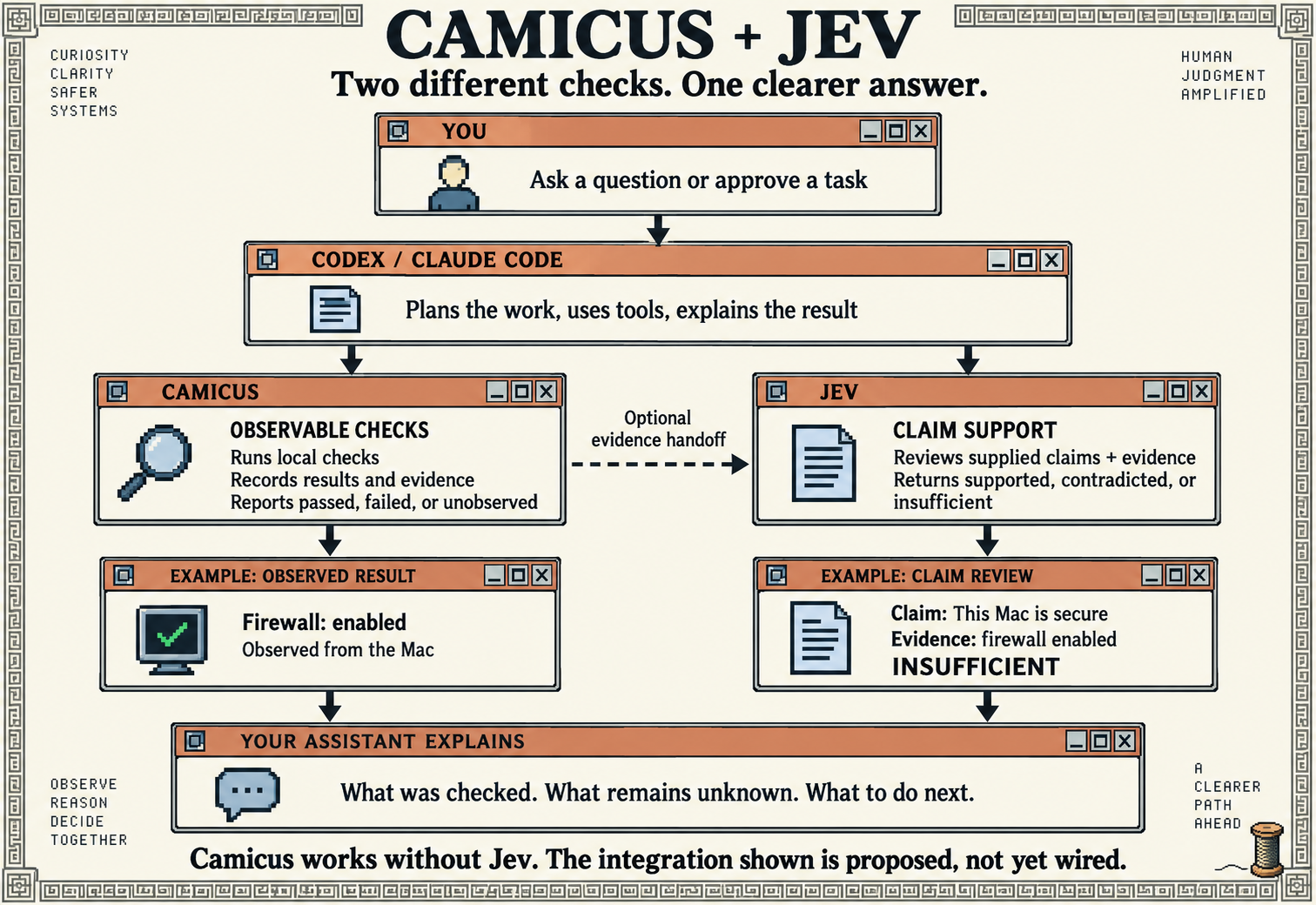
Camicus and Jev
Camicus runs explicit local checks. It observes authorized files or selected Mac command output, applies a fixed contract and saves a structured result. This layer is implemented now.
Jev is an optional proposed review handoff. A separately authorized semantic review could assess a selected explanation or decision against its supplied evidence and flag unsupported claims. It would not replace Camicus’s collectors, rerun device checks or make an unobserved check pass. This plugin does not call Jev automatically.
You decide what to share and what to do. Any Jev handoff needs its own input scope, access and authorization. Camicus results alone do not prove that a Jev review happened.
ALPHA 0.1.0
Take it with you.
Alpha 0.1.0: Codex and Claude Code manifests, both workflow skills, the local executable and installation guide. Review the package before loading it.
macOS 14+ / Python 3.11–3.14
MIT licensed / Public alpha 0.1.0
Source on GitHub
Browse the source, inspect the tests or follow development. Camicus is an experimental public alpha: use its bounded results, not a whole-device security verdict.
Browse source on GitHubReal results may contain private project or machine details. Your authorized assistant can read them; review its provider settings and share deliberately.